Tuesday, November 15, 2016

My Road to FPV (Part Two)

As per usual with anything that grabs my interest it was a very slippery slope for me into the world of multirotor aircraft. Not long after find the Mr. Steele videos it was my son’s half birthday and I decided it was the perfect excuse to get him a quadcopter. After spending a few hours going over a bunch of aircraft on Amazon, I eventually settled on the Syma X5C. Based on the reviews it seemed to be a good starter drone and it had a camera that let you take photos and video. It also didn’t hurt that it was priced at just under $50.

Once the order was placed I started searching online for tips on flying quadcopters and some basic tips for getting started. I found the MyFirstDrone.com website and found the How to Fly a Quadcopter tutorials very helpful. The most important thing I picked up from that page is to start out slowly and eventually expand your comfort zone. Another great resource is oscarliang.com. I may be overly cautious, but I feel like a lot of people take these things out of the box and immediately see how high they can go resulting in them losing control of the quadcopter and it getting stuck in a tree or even just losing it.

After my son opened the Syma X5C we took it out to the backyard for its maiden flight. I will admit I only glanced at the instructions ahead of time because I was excited to fly, everything turned out fine, but in hindsight it is always a good idea to read through the instructions. My first impression was it was much lighter than expected and the quality of the radio transmitter(the controller) was pretty good. The process of getting started was pretty simple, we just took it out of the box, installed the prop guards, put the battery in and bound it to the radio. Our backyard is long and narrow and surrounded by trees, which isn’t ideal for learning to fly, but it is wide enough that it was fine for learning the basics of hovering. I throttled up and practiced going up and down before then attempting to pitching forward and backward. I then brought it down and gave my son a shot at it and he quickly mimicked all the same maneuvers as me.
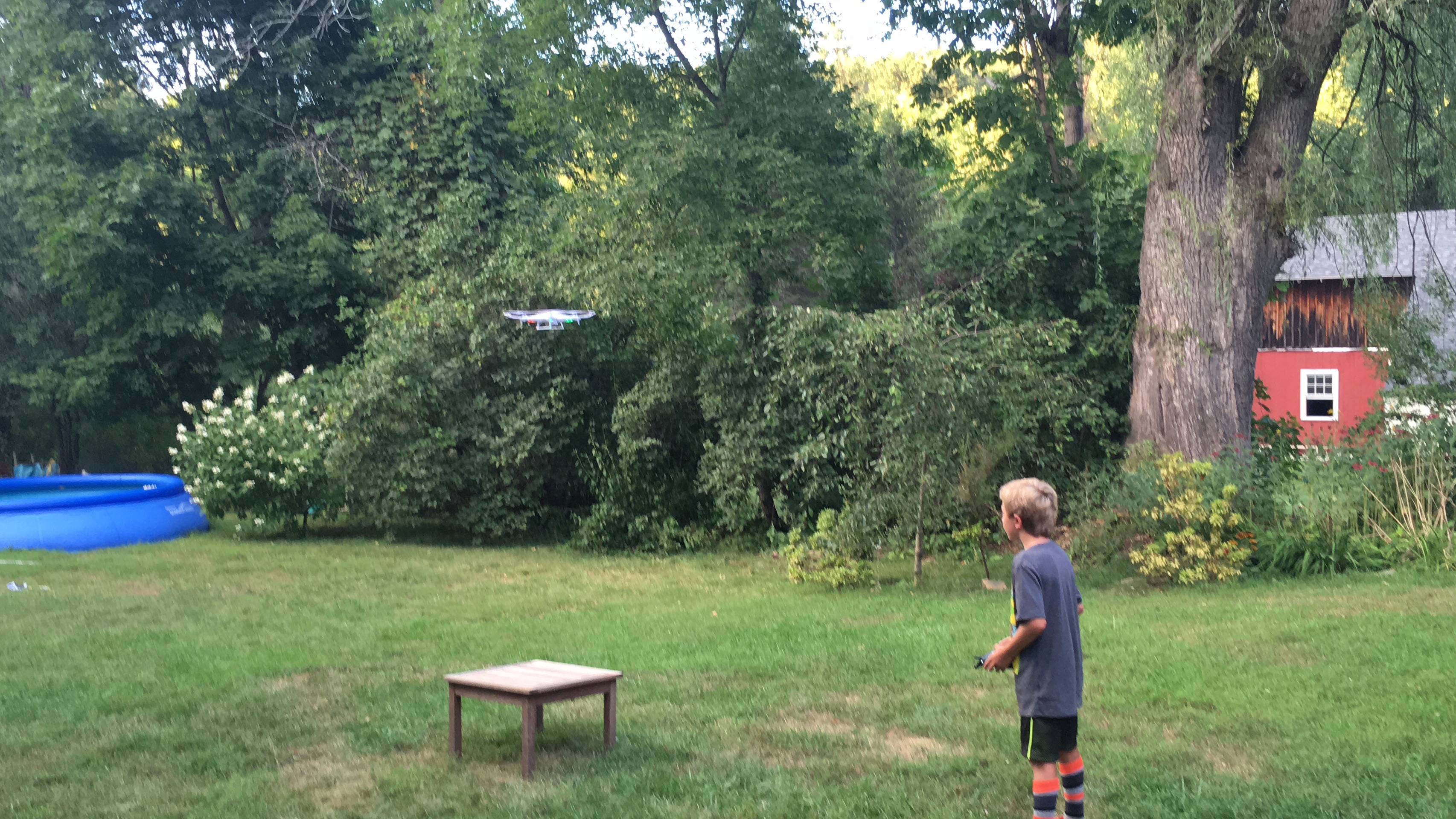
Kaleb Flying

We moved on to rolling to the left and right, which worked out fine. One nice thing about the Syma X5C is it has switches for controlling the camera right on the radio, so you can take a photo or start/stop recording video. The quality of the camera is about what I expected, although the lens is a little off center so all the videos and photos are slightly askew. Check out Drone over Merrimack (YouTube) for an example of the video quality. Here is an image from the camera taken in the early evening.

  Syma X5c Photo

We took turns until the battery ran outseven minutes later and went back inside to charge it.
At this point I had learned the following things about quadcopters:
  • The radio transmitter has two sticks that are used to control the quadcopter. The sticks are configured differently based on the mode of the transmitter. There are four different modes, but the most common are Mode 1 and Mode 2. See Oscar Liang’s RC Transmitter Modes for details on the modes. After much hemming and hawing I decided on Mode 2, but not for any particular reason.
  • There are many different flight modes available for quadcopters. The flight mode determines how it will behave in the air when it receives commands from the transmitter. The Syma X5C uses Self Level aka Horizon mode, this means that if you let go of the stick that controls the pitch and elevator it will automatically level off to be parallel to the ground. It doesn’t have elevation hold so if you let take your finger off the throttle it may stay in place, but will most likely move around a little bit.
  • The battery is small and doesn’t last a long time, but you can buy 5 or 6 more for the Syma X5C for about $15. Most if not all quads use LiPo (lithium polymer) batteries, which aren’t the same as the rechargeable AA batteries you may be used to. They require special care and shouldn’t just be left to charge if you aren’t around them. I strongly recommend reading Roger’s Hobby Center: A Guide to Understanding LiPo Batteries
At this point the Syma X5C was fine, but I wanted something of my own so I started researching more and found the perfect starter quad for me, the Hubsan X4 107C

Go back and check out My Road to FPV (Part One)
Continue reading My Road to FPV (Part Three)

Sunday, October 30, 2016

My Road to FPV (Part One)

Over the summer my nine year old kept asking us to buy him a “drone”. I didn’t know much about it besides the fact that my dad recently bought something called the DJI Phantom 4. Little did I know a couple months later I would be the one carrying on about drones, watching YouTube videos and making a plan for my new hobby. Here are the details about how I got interested in first person view (FPV) multi rotor aircraft and my initial plan for easing into the hobby.

During our summer vacation my son continued to bring up the drone thing and I realized it wasn’t just a passing interest. I decided to use it as a teaching experience and asked him to do some research about drones so he could pick out the best one for him. Since this gave him an excuse to search the internet he jumped at the opportunity and started making a basic spreadsheet with the different options. In order to properly help I also had to learn about them and began doing my own research. I quickly found there was a huge range of different options ranging from $20 to over $1,200. Most of the options we looked at had cameras, which seemed like a very interesting feature and a must have to keep his interest. Some of the drones had altitude hold, which let you take your hands off the throttle and it would just hover in place. I also found out the smaller less expensive ones had a battery life of around TEN minutes, which seemed really short. Once we finished the spreadsheet he quickly lost interest and all was forgotten for the time being.

A few weeks later I was using the Periscope app on my Apple TV and this guy Mr Steele was broadcasting live from a mall parking lot so I took a look. He never ended up flying but it seemed interesting so I did a quick YouTube search and found his channel. Over the next half an hour I probably watched 10 different videos and was hooked. The channel is a mix of footage shot from a GoPro mounted on his quadcopter, very short vlogs and some instructional videos.
Some of my favorite videos on Mr. Steele’s channel:

At this point I was extremely interested in the world of racing quadcopters and decided it was something I was going to look into doing, not the racing, but the flying of this type of aircraft. However rather than just diving in and spending a ton of money right away, I decided to come up with a plan for this new hobby and how I would work my way up the rungs of the ladder in the correct order. This is the first in a series of blog posts documenting my plan and the execution of that plan.
My Road to FPV (Part Two)

Tuesday, May 24, 2016

Disabled iTunes Playlist Tracks

The Problem
I recently upgraded to iTunes 12.4 on my work laptop (Windows 10) and noticed some weird behavior with some playlists and songs.  As you can see in the screenshot below some of the tracks are grayed out, but I can't figure out what it means.  If I double click on them they play fine, but the grayed out tracks are skipped when transitioning to the next song.  For example, double clicking on Adventure of a Lifetime will play it, but once it ends, the next track that plays is Good for You
I initially thought the difference was because my iCloud Music Library has a combination of purchased, iTunes Match and Apple Music tracks.  However, after looking at the Get Info pop up I found the grayed out tracks were all Apple Music sourced (Off to the Races, Everglow), but there were also Apple Music tracks that weren't grayed out (Hello, Paper Planes). There is also a mix of Loved and Not Loved tracks.  I tried downloading from iCloud for some of the tracks, but that didn't seem to help. 
At quick glance it is only happening to this playlist, but if I go to the Artist view and look up Coldplay or Lana Del Rey the albums with the grayed out tracks are also grayed out.  

The Fix
I did some searching online and was able to fix it by right clicking on the songs and choosing the "Check Selection".  Not sure what this feature is for, but it causes the tracks to not be included in continuous track playing.


Sunday, May 15, 2016

Adopting the iPad Lifestyle

I have been very interested in the ongoing discussion about the iPad-only lifestyle on all my favorite podcasts. It has made me think a lot about how I use my iPad and more importantly how I could be using my iPad for more tasks. A few weeks ago I bought a 9.7" iPad Pro with the intention of taking my iOS game to the next level. It has been an interesting experiment and has required me to rethink my usual workflow at both home and work.

The Dev Diary

The first thing to go was going to be my “Daily Dev Diary”. For the last few years I have been printing out a sheet of paper each day for keeping me on task and for keeping track of little things that happen during the day. Each morning I take my notes from the previous day, update the source document and then create the next day. The document has four sections to cover things I want to do over the long term, things I did yesterday, things I have to do today and random notes.

Migrating this process to include the iPad, was pretty easy once I settled on using Good Notes 4 as the primary note for note taking. I start by editing the master markdown document on my laptop and print the current day out to a PDF using Google Chrome. The PDF resides in OneDrive, which I use for all of my work file needs. I open up Good Notes 4 and import the document using the OneDrive integration. Once in the app I am able to use my Apple Pencil to markup the document as I had before. At the end of the day I export the document back to the OneDrive folder and voila it is ready for the next day. It was weird at first walking around with the iPad, but eventually it became natural and I don’t think I could go back to using the paper.

Secretary’s Day

One of my extracurricular activities involves being the secretary for the local youth baseball league, Merrimac Baseball. Due to my recent success with my dev diary, I thought it would be a piece of cake. I immediately ran into a problem with the first step in the process, duplicating an existing iCloud Drive document. I normally take the previous meeting minutes markdown file and make a copy, but there didn’t seem to be an easy way to do this in iOS. I opened up the iCloud Drive app, but it only provided me with a limited set of options. My markdown editor of choice, Byword recently added support for editing iCloud Drive documents, but I couldn’t figure out how to “Save As” or “Duplicate” the files. In the end I turned to Workflow for iOS and created a custom workflow that would let me select an iCloud Drive file and save it somewhere else. It took a few tries to get it right, but now I have it there to use whenever I need to copy a file. Once I duplicated the file it was all downhill from there, because I just used GoodNotes for my note taking.

After the meeting I had to transcribe my notes back into a markdown file, which I did using the new split screen feature in iOS 9. Byword had some problems displaying the full keyboard in split screen mode so that wasn’t great, but I did eventually figure it out. Finally after exporting the PDF to iCloud Drive I had to upload it to the baseball website. At first I wasn’t sure if it was possible, but once I clicked on the file chooser button on the web page in Safari, I was presented with my iCloud Drive directories and quickly found the PDF and added it to the site.

Learning the Ropes

So far the iPad lifestyle experiment has been successful for me because the device is so portable and I have found my original assumption about it being too much work to do things in iOS was flawed. There are definitely times when I have to put on my thinking cap and figure out the iOS way to do something, but in most cases it involves a simple solution, I will easily be able to apply in the future. I look forward to continuing this trend and expanding the amount of things I can do on this wonderful little device.

Monday, May 9, 2016

Introducing the Kilobyte Microcast


Last night I published the first episode of my new podcast, Kilobyte. It is a microcast where I will be talking about my thoughts on a wide range of my interests like technology, life as a software developer, the parenting and hopefully some funny anecdotes about my life. Initially I want to post 5–10 minute long episodes a couple times a week. Although I am looking forward to seeing how it evolves over time as I learn my voice and start to get better at audio editing.

Here are a few ways to subscribe:

Saturday, May 7, 2016

Heroku Database Problems

I have been using Heroku for over a year now and have learned quite a bit along the way. I have a very simple Java web application for my work softball team, TAP Softball. It uses a Postgres database and contains basic information like the teams, schedule and standings. The database connection is configured using Spring and Hibernate, with the database URL and credentials hard coded right into the Spring context file. Using Eclipse and the Tomcat plugin I can deploy the web application locally to test changes prior to deploying to the server. I also have a local database I use for testing database changes before pushing to the live database. In the Spring context file I have a commented out localhost datasource defined, which I swap in when testing locally.

Yesterday, I received an email from Heroku that my database was going to be upgraded with the latest Postgres changes. A few minutes later an email confirmed the upgrade finished successfully. I had seen these messages before and thought nothing of it until this morning when I tried to use the site and got a big fat stack trace.

It didn’t take long to see the database URL and credentials had changed, which as you probably figured out was problematic since I had them hard coded. I quickly scrambled to fix the issue because I didn’t have access to my MacBook. The Dropbox deployment method didn’t work so I installed the Heroku Toolbelt and was able to update the database connection information. The site was back online, so I took a breather and then emailed support to find out what was going on.

Support promptly responded to my message and explained that if an upgrade doesn’t go perfectly the database will move to a different address and reset the credentials. He also said I should be loading my database connection information from the environment variables, so it will start up correctly should the database move again. I did a little searching and found Connecting to Relational Databases on Heroku with Java. After scrolling down I quickly found that I had to add a new Spring bean that would instantiate a Java URI using the DATABASE_URL environment variable. I also had to update my existing dataSource bean to get the host, port, path, username and password from the URI bean. I pushed the change up to Heroku and it worked.

My next challenge was to get my development environment working again, because now Tomcat was getting a null pointer exception when trying to generate the URI bean. After some trial and error I figured out that I needed to modify the run configuration for the Tomcat server in Eclipse to have a new entry in the Environment tab for the DATABASE_URL. The value to use came from my app’s database page on the Heroku site, in the last item called URL. Making this change and starting the server loaded the homepage, but when I attempted to load a page that used the database I received an error about SSL.

I remembered having problems connecting to the database originally, and to fix it I added ?ssl=true&sslfactory=org.postgresql.ssl.NonValidatingFactory to the end of the path. Unfortunately just sticking that onto the end of my Run Configuration’s environment variable didn’t work. I also had to add + '?' + @dbUrl.getQuery() to the end of the url property in my datasource bean. In the URI the part after the question mark is called the query and by appending it to the end of the path it fixed my issue. I pushed the change up to the server and it still worked fine. The best part is now I can easily create separate run configurations for the remote and local databases rather than randomly updating one of my Spring configuration files.

Tuesday, April 26, 2016

Browser Zoom Factor

In the summer of 2015 I noticed our Flash application looked slightly different in the Chrome browser. Since it was very subtle and I usually develop using IE 11, it didn’t really pique my interest. Around the same time I had also heard some complaints about blurry images on some newer laptops.

Fast forward to February 2016…

While researching a bug related to a Flash Player change, see my post Flash Problems I uncovered a new feature that was slowly added to Flash Player over a few different versions called, Browser Zoom Factor. The feature will scale a Flash application using the browser’s scale setting. It was first introduced in Flash Player 18, but at that time it was always on for supported browsers and there was no way to shut it off. In the fall of 2015 in Flash Player 19 developers were given a parameter for disabling the zoom factor.

It turns out the weirdness I was seeing in Google Chrome was caused by the browser zoom factor. By default my installation was always zooming to 85%, which in turn zoomed the application to 85% making the logo a little less clear and making the view a little bit smaller than in IE 11. Of course my instinct was to turn this off, because I didn’t want somebody to unexpectedly see the application with blurry images, so I added the special parameter to shut browser zoom factor off.

Fast forward three weeks…

Our IT department started rolling out Microsoft SurfaceBook to a few employees for a trial and within a couple days I received a complaint that our application was “unusable” on a high resolution display. I ran over to see the situation, because I had never seen our application on a high resolution display. He was right the application was so small on the SurfaceBook and was extremely hard to use. At that point I realized I had forgotten about using the browser zoom factor in the other direction.

In the end I turned the browser zoom factor feature back on for our application so user can zoom in or out as needed. I know at some point a defect will be filed about the images looking terrible, but at least push it back and have the user not zoom in so much.